- Haresign Consulting
- 09 Aug, 2026
- CQC
- 9 min read
Introducing the Haresign Clinical Safety Register: a living DCB0160 record for GP practices
Earlier this year we published DCB0160 for GP Practices: What It Means and What You Need to Do .
The central point was straightforward: the supplier's clinical safety work and the practice's clinical safety work are not the same thing.
DCB0129 is concerned with the manufacturer and the safety of the product. DCB0160 is concerned with the organisation deploying and using it.
That means a supplier can provide a hazard log, clinical safety case and other assurance evidence, but those documents cannot describe exactly how the system is configured in your practice, who monitors it, how requests move through your workflow, what integrations exist or what local controls you rely on.
Knowing what DCB0160 requires is one problem.
Having somewhere practical to manage the work is another.
That gap became the starting point for the Haresign Clinical Safety Register.
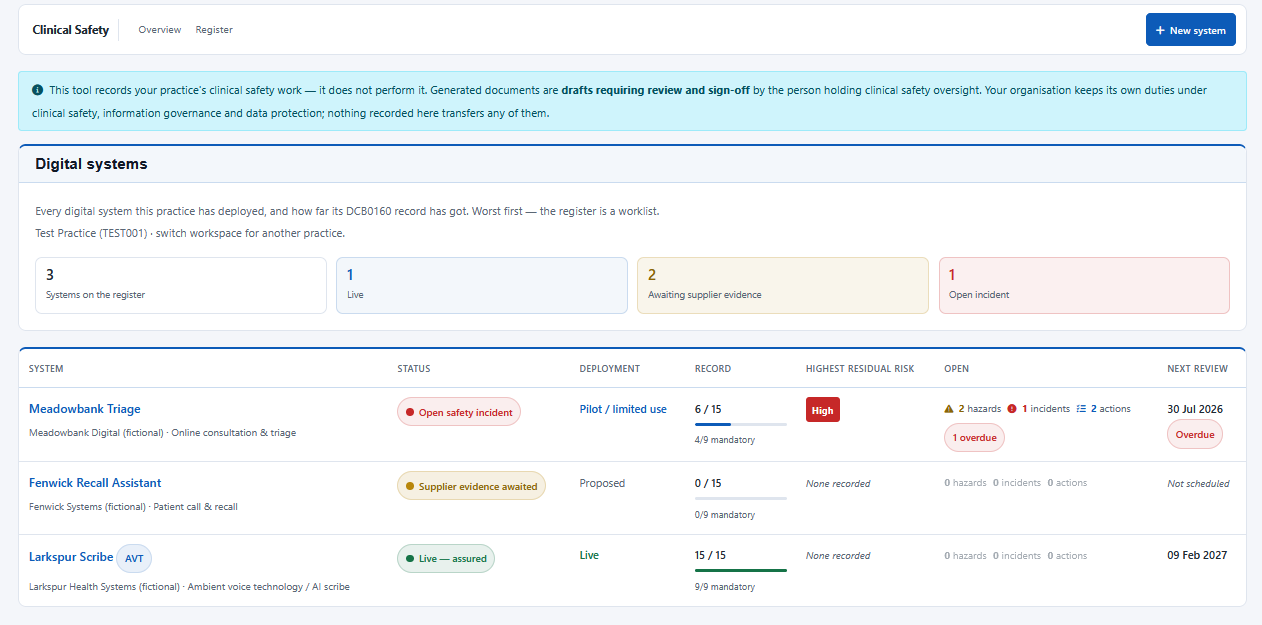
One living safety record for each digital system
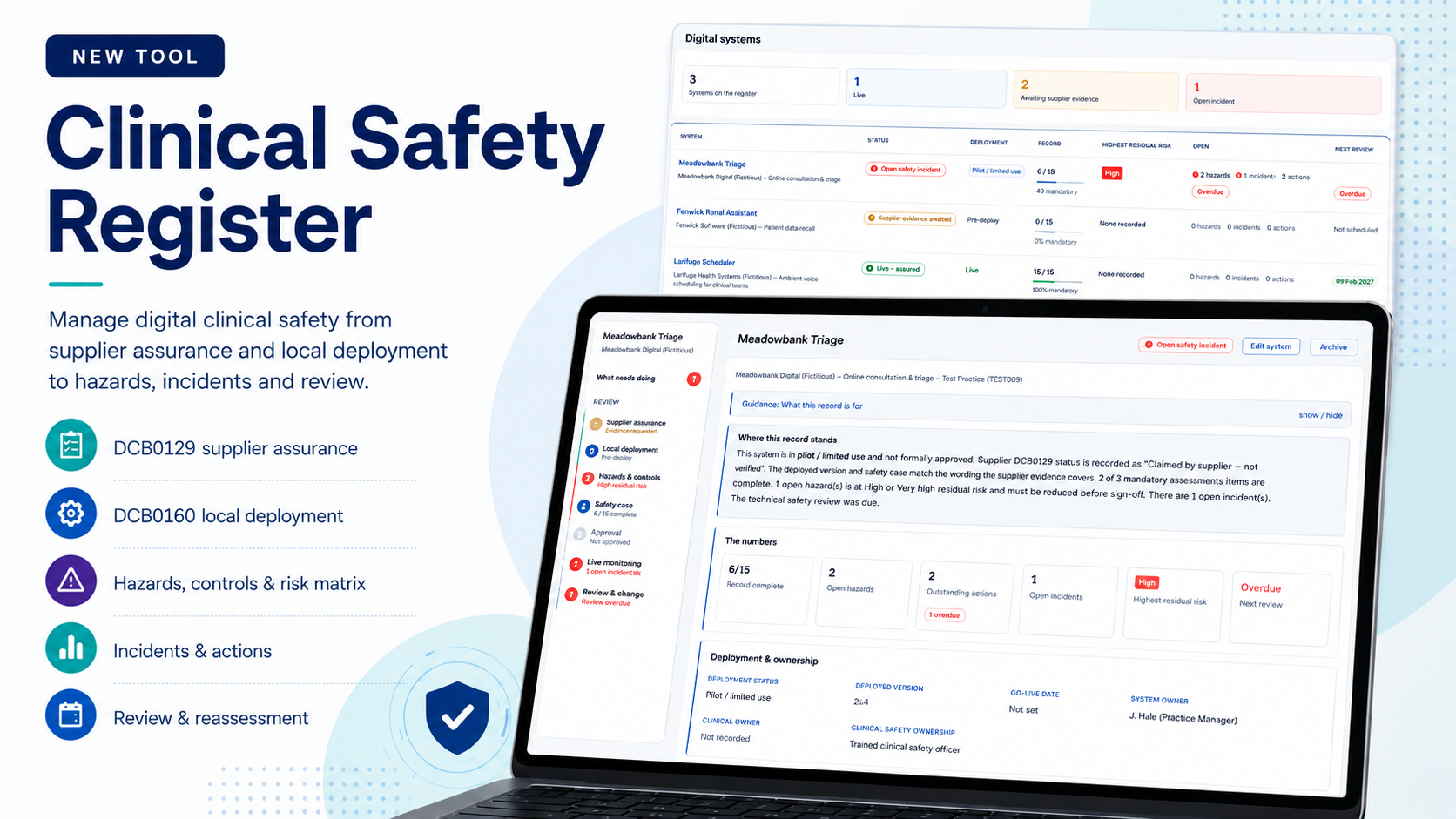
The Clinical Safety Register is a DCB0160 deployment register built specifically for GP practices.
A digital system — whether that is an AI scribe, online consultation platform, recall tool or another system affecting care — has its own clinical safety record.
That record can hold the supplier's assurance evidence, the practice's local assessment, hazards and controls, safety-case documentation, approval decisions, incidents after go-live and the reviews that keep the record current.
It is deliberately practice-scoped. A PCN workspace does not inherit or aggregate the DCB0160 records of its member practices, because the deployment responsibility remains with the individual deploying organisation.
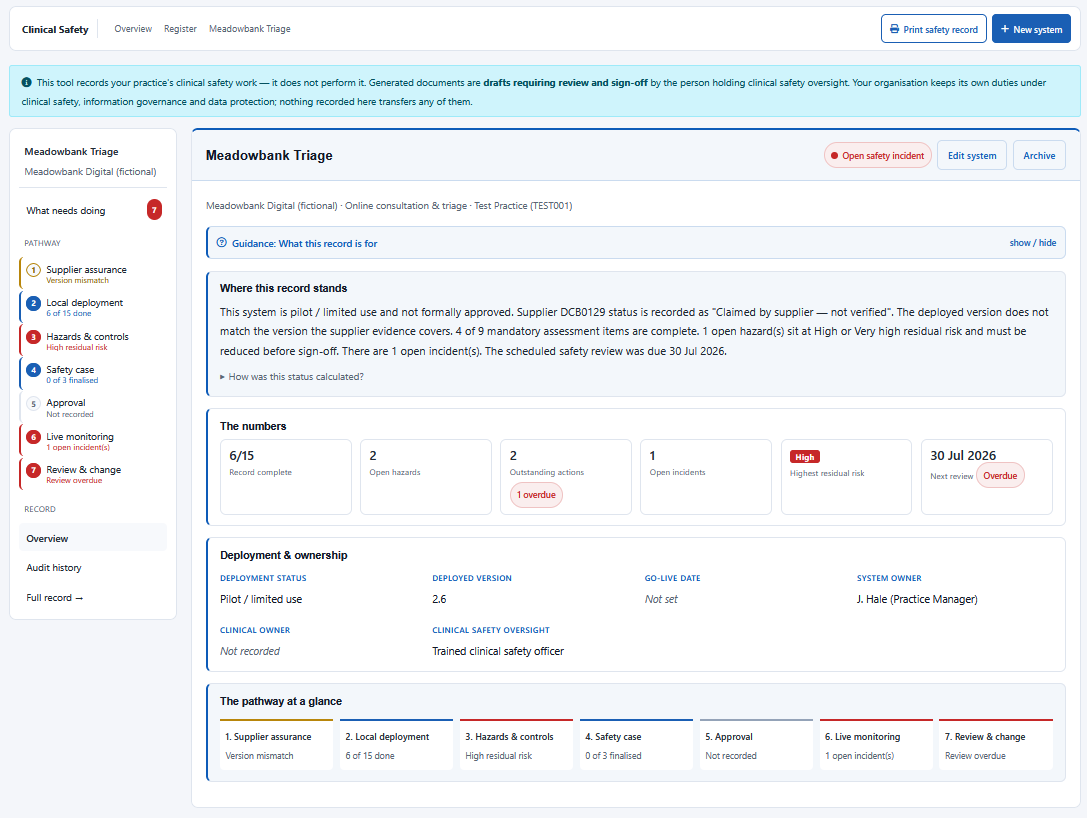
Start with where the record actually stands
The landing pane for each system is designed to answer a more useful question than simply whether the record exists:
What still needs attention before we can be comfortable with this deployment?
The overview explains the current position in plain English and surfaces record completeness, open hazards, outstanding actions, incidents, highest residual risk and the next scheduled review.
It also shows the whole pathway at a glance, so an incomplete supplier assessment cannot disappear simply because the local deployment section has been filled in.
The work follows a defined pathway
The record contains ten panes, arranged broadly in the order the work happens.
Your supplier's DCB0129 does not cover your deployment
This is probably the most important distinction in the whole application.
DCB0129 is the supplier's standard. DCB0160 is the deploying organisation's standard.
A supplier's clinical safety case describes its product. Your local record has to describe what happens when that product meets your workflow, configuration, integrations, staff and patients.
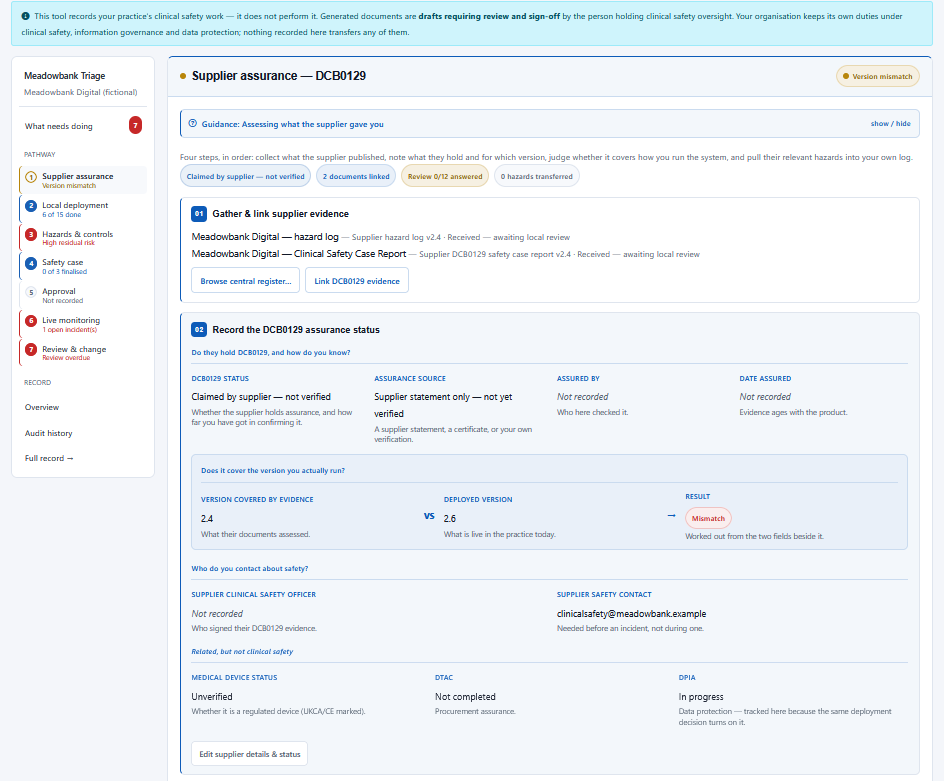
The Supplier Assurance pane therefore does more than provide somewhere to upload files. It works through four steps:
- Gather and link the supplier's evidence.
- Record what assurance status the supplier actually holds.
- Review that evidence against the way the system is deployed locally using 12 structured questions.
- Transfer relevant supplier hazards into the local hazard log.
Received is not the same as reviewed
Copying a supplier's clinical safety case into the record means the practice possesses the document. It does not mean somebody has read it, challenged it or decided that it is relevant to the local deployment.
A practice can therefore copy every document a supplier publishes into the system and the register will still correctly show that the assessment itself has not been completed.
The same principle applies elsewhere: Not recorded, Not applicable and a substantive answer are different facts. A deliberate N/A can count as complete. A blank does not.
Then assess what you are actually doing locally
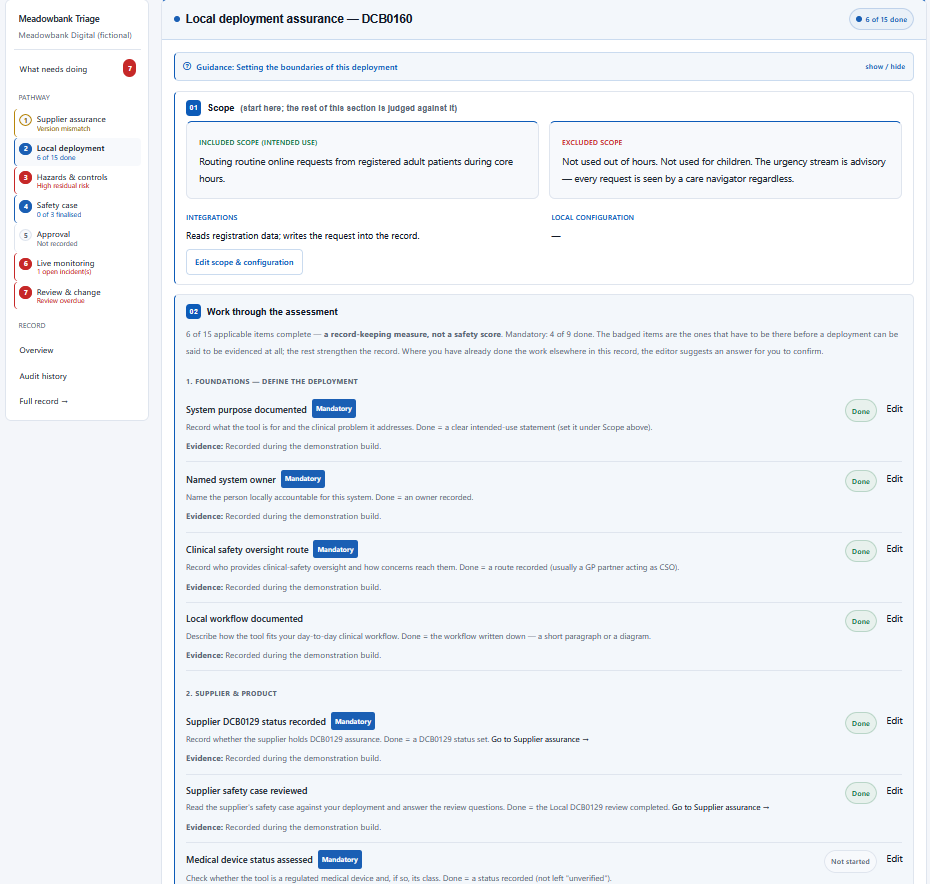
The DCB0160 pane starts by defining the deployment boundary: what the system is intended to do, what it is not intended to do, its integrations and any local configuration.
The practice then works through 15 assessment items across five stages, nine of which are mandatory.
Where the answer already exists elsewhere in the safety record, the editor can suggest that existing information for the person completing the assessment to confirm.
Inference suggests. It never answers.
A record-keeping measure that silently completes itself would provide very little evidence that somebody had actually considered the question.
A complete record is not necessarily a safe deployment
Record completeness measures record keeping. It is not a clinical safety score.
15 of 15 complete does not mean "safe"
A record with every assessment item completed but an unreduced High residual risk is a fully documented unsafe deployment. The application reports the risk rather than turning the record green.
Administrative completion should never override the clinical safety position.
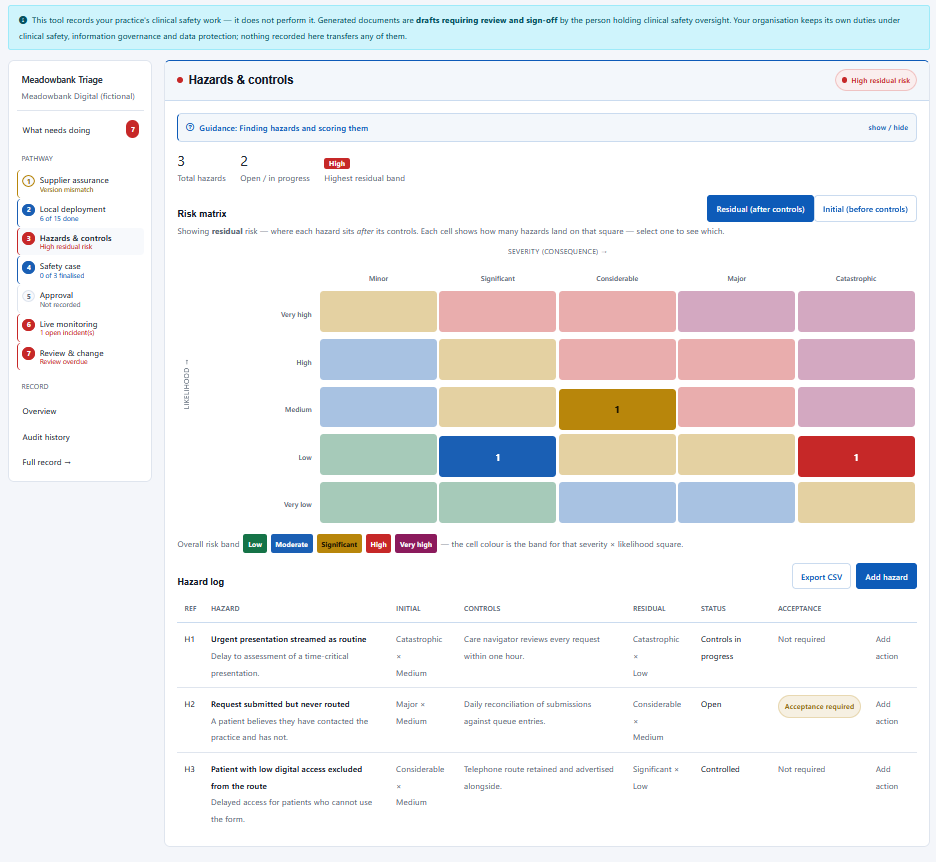
Risk is assessed before and after controls
Every hazard is scored twice.
The initial score describes the risk before controls are applied. The residual score describes what remains after those controls are in place.
The gap between them is part of the argument a safety case needs to make: this was the hazard, these were the controls, and this is the risk that remains.
The matrix itself is implemented as a lookup table rather than simply multiplying severity by likelihood. The five displayed risk bands have also been checked for separation under simulated colour-vision deficiency, and every status is displayed as text as well as colour.
Supplier hazards do not arrive with somebody else's risk score
Supplier hazards can be transferred into the local hazard log, but their supplier scores are deliberately not copied with them.
A supplier's likelihood assessment is based on the environment and controls it assumed when assessing the product. Your deployment may be different.
The practice therefore re-scores each transferred hazard for its own environment.
The safety case is evidence, not a generated conclusion
The application can generate editable Word drafts for:
- the Clinical Risk Management Plan (CRMP);
- the hazard log;
- the Clinical Safety Case Report; and
- a staff briefing.
They are intentionally produced as .docx files rather than PDFs. They are meant to be reviewed, challenged and rewritten by the person holding clinical safety oversight.
[To be completed by the Clinical Safety Officer] rather than manufacturing an answer.The application does not produce a signed-off clinical safety case.
Blocking issues and ordinary outstanding work are not the same thing
The What needs doing pane deliberately separates blocking issues from less urgent outstanding work.
Three supplier documents waiting to be read should not sit at the same level as a hazard capable of causing serious patient harm.
The worklist also catches an approval decision recorded over an incomplete safety case.
Clinical safety does not stop at go-live
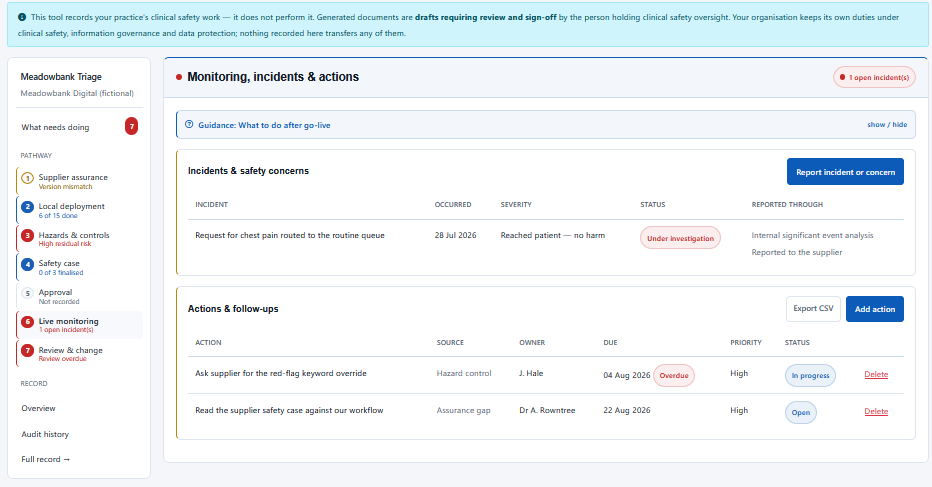
Systems change. Workflows change. Suppliers release new versions. Incidents can expose risks nobody anticipated.
Practices can record incidents and concerns, maintain follow-up actions and keep them connected to the system and its safety record.
Reporting routes are recorded separately, including:
Recording one route does not imply that another duty has been satisfied. Where harm is recorded and no external report exists, the tool prompts the user to consider it, but does not block the record because it does not know the facts of the event.
And then the record has to be revisited
Each system can have a review schedule and a structured 15-question reassessment covering what has changed since the previous decision.
The safety record remains living evidence rather than something completed during implementation and forgotten.
Every subsequent change is preserved in an append-only audit history.
A central supplier evidence register
The application includes a staff-curated central DCB0129 register. At launch it contains 19 supplier products and records the clinical safety documents each supplier publishes.
When a matching system is added, supplier information can be pre-populated and relevant documents copied into the practice record.
The practical extras
It records and organises the practice's work. It does not make clinical safety judgements.
Generated documents remain drafts requiring appropriate review and sign-off.
Supplier assurance information records what suppliers claim and publish.
The practice retains its clinical safety, information governance and data protection duties.
An appropriately qualified person still needs to make and own the decisions.
A fully completed record can still contain unacceptable risk.
Practice governance still comes first
Before anything is stored in the Clinical Safety Register, a Data Processing Agreement is required, on the same footing as Haresign's CQC Searches product.
The software provides structure and record keeping. The organisation retains its own clinical safety, information governance and data protection responsibilities.
From guidance to something practical
Why we built it
When we wrote our original DCB0160 article, the practical challenge became difficult to ignore.
The work needed to document a local safety position can still be spread across supplier folders, spreadsheets, Word documents, meeting notes and people's inboxes.
The Clinical Safety Register does not try to remove that work. It gives the work somewhere to live.
Clinical Safety Register
A structured DCB0160 deployment register for English general practice.
The Clinical Safety Register is a premium Haresign tool available through the Pro Tools entitlement.